





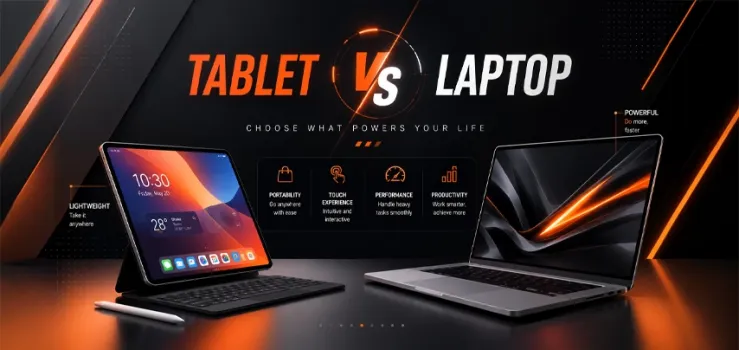
Tablet vs Laptop is one of the biggest decisions students make before starting a new academic year. Every admission season, thousands of students ask the same question. Should I buy a tablet or a laptop? Choose the wrong device, and you could spend money on features you never use or discover that your device cannot run the software your course requires.
The right choice depends on what you study, how you learn, and how you use your device every day. A student preparing for HSC exams, a CSE undergraduate, and an architecture student all have different needs. Battery life, performance, software compatibility, portability, and your budget all matter. In Bangladesh, long commutes and occasional load-shedding also make a real difference when choosing a study device.
In this blog, we'll compare tablets and laptops in simple terms. You'll find a side-by-side comparison, real laptop vs tablet price in Bangladesh across different budgets, and practical recommendations based on your field of study.
Whether you're looking for the best device for online classes in Bangladesh, deciding between a laptop or tablet for students, or wondering which is better for studying laptop or tablet, this blog will help you make the right choice.
If you are still not sure which device fits your needs?
You can explore EERNA's latest laptops and tablets to compare genuine products, current prices, and warranty-backed options while you read through this blog!
Quick Answer: Tablet or Laptop?
For most students in Bangladesh, a laptop is the safer first purchase. The laptop or tablet for students question comes down to this, a laptop runs every software your university requires, handles typing-heavy assignments faster, and works fine even without internet.
A tablet makes sense as a second device for reading, note-taking, and light browsing, or as your only device if your course is genuinely light on software, like general BBA classes or basic online coursework. If you can only buy one device for four years of university, buy a laptop first.
Tablet vs Laptop: Side-by-Side Comparison
Here is the fast comparison before we go deeper into each factor separately. Each row below gets its own detailed breakdown further down the page.
This table gives you the shape of the decision. The sections below explain why each row matters for your specific course.
Portability and Weight
A tablet usually weighs between 400 and 700 grams, light enough to carry in a small bag all day without noticing it. A laptop weighs 1.2 to 2 kilograms, depending on the screen size, which is still manageable but noticeably heavier when you are walking between classes.
If your day involves moving between multiple buildings or a long rickshaw and bus commute, a tablet is easier on your shoulder. For a laptop that still travels well, EERNA's Ultrabook range keeps weight under 1.5kg while still running full desktop software.
Battery Life, and Why Load-Shedding Makes This Matter More in BD
Battery life matters more in Bangladesh than in most countries right now, because power cuts are still a daily reality outside major city centers. According to reporting from The Daily Star in 2026, students in Dhaka face roughly one to two hours of outages on a bad day, while those outside Dhaka often deal with two to three hours, and rural areas can see five to ten hours of cuts depending on the region.
A tablet typically runs 8 to 12 hours on a full charge, which comfortably covers a full day of classes even through a couple of outages.
A laptop usually runs 5 to 10 hours, depending on the brand and how hard you push the CPU, so if you live somewhere with longer load-shedding, checking the battery rating before buying matters as much as checking the processor.
Performance and Software Compatibility
This is where the tablet vs laptop for university students question usually gets settled fast. A laptop runs full desktop software, including AutoCAD, MATLAB, Visual Studio, SPSS, and any exam portal that requires a proper browser environment, while a tablet mostly runs simplified app versions or none of these at all.
If your course requires you to install specific software for assignments or exams, a tablet alone will not get the job done. Even the most powerful tablets on the market cannot replace a real Windows environment for engineering simulations, statistical software, or coding environments that expect a full file system.
Note-Taking and Stylus Support
For handwritten notes, diagrams, and marking up PDFs, a tablet with a good stylus genuinely beats typing on a laptop. The tablet vs laptop for note-taking debate favors the tablet here, since writing by hand on a screen feels closer to writing on paper and helps many students retain information better during lectures.
A stylus-compatible tablet like the Samsung Galaxy Tab S9 FE Plus works well for this, and EERNA's stylus pen collection covers budget options if your tablet does not include one in the box.
If you plan to convert handwritten notes into typed documents later, a laptop still wins for the second half of that workflow.
Price Comparison: Tablet vs Laptop in Bangladesh
Laptop vs. tablet prices in Bangladesh vary a lot depending on the brand and specs, but the general rule holds across every tier, a similarly specced tablet usually costs less than a laptop with a keyboard and full OS included.
Here is how the three tiers break down at a glance.
Budget Range (Under 40,000 Taka)
At this level, you are choosing between a large-screen tablet for reading and browsing or a laptop that can just about handle light coursework.
Here is what each option gets you.
Tablet pick: The HONOR Pad X8a gives you a large 11-inch screen for reading, browsing, and note apps at a fraction of laptop cost.
Laptop pick: A budget laptop in this range typically comes with an entry-level processor and 8GB of RAM, enough for typing, browsing, and light coursework but not much beyond that.
Best for: HSC-level study and general reading, where you do not yet need specialized software.
Suppose your budget is exactly 35,000 taka. You could buy a capable Android tablet with room left for a keyboard case, or stretch into an entry-level laptop with less headroom for extras. Either choice works for HSC-level study, the real decision comes down to whether you need to install specific software.
Mid-Range (40,000 to 80,000 Taka)
This is where most university students end up shopping, since it balances price against real day-to-day performance.
Here is what your money gets you at this tier.
Tablet pick: The Xiaomi Redmi Pad Pro offers a sharp WQHD+ display and enough storage for years of notes and PDFs.
Laptop pick: A mid-range laptop from a brand like Acer typically ships with a Core i5 or Ryzen 5 processor and 8 to 16GB of RAM.
Best for: Private university and general degree students who need office software, browser-based tools, and moderate multitasking without paying for power they will not use.
Premium (80,000+ Taka)
At this level, both device types step up to genuinely professional-grade specs, but the value only shows up if your coursework actually needs it.
Here is the breakdown.
Tablet pick: The Apple iPad lineup brings Apple Pencil support and desktop-class performance for creative work.
Laptop pick: Premium laptops step up to dedicated graphics, higher RAM, and faster storage for engineering, video editing, or heavy multitasking.
Best for: CSE, architecture, and design students whose coursework genuinely demands the extra power.
If you are not in one of those fields, spending this much rarely pays off in your day-to-day study experience.
Which One Fits Your Field of Study?
Your course matters more than your budget when choosing between these two devices. Here is how it breaks down by field.
HSC/SSC Students and Admission-Test Candidates
At this stage, most of your work is reading textbooks, watching recorded classes, and practicing MCQs on various admission-prep apps. A tablet like the HONOR Pad 8 handles this comfortably and is easier to carry to coaching centers than a laptop.
Unless you are already coding or using design software before university, a tablet is usually the better device for this stage, and it costs less too.
Private University Students
BBA, English, Law, and similar programs mainly involve reading, writing assignments, preparing reports, and creating presentations. A laptop handles these tasks more comfortably than a tablet.
The HONOR Pad 9 is a solid companion device for lecture notes and reading, but you will still want a laptop for typing longer assignments and presentations.
Best device for online classes Bangladesh questions come up a lot from this group specifically, since many private universities run hybrid classes. A laptop handles video calls, shared documents, and typed notes all at once far better than a tablet alone.
Engineering and CSE Students
If you are studying CSE, EEE, or any engineering discipline, a laptop is not optional. Software like Visual Studio, MATLAB, AutoCAD, and various compilers simply will not run properly on a tablet, and this is one of the clearest which is better for study laptop or tablet answers in this whole blog.
Look for a laptop with at least a Core i5 or Ryzen 5 processor and 16GB of RAM if your budget allows.
EERNA's HP laptop range covers this spec level at several price points, with configurations built to handle compiling code and running virtual machines without slowing down.
Art, Architecture, and Design Students
This is the one group where a tablet genuinely competes with a laptop, especially for sketching, digital illustration, and early-stage design work. A stylus-enabled tablet paired with EERNA's graphics tablet range for more precise pen input covers sketching and concept work well.
That said, architecture students still need a laptop eventually for AutoCAD, Revit, or 3D modeling software once coursework moves past the sketching stage. Best budget device for Bangladesh students in this field usually means a tablet for year one, followed by a proper laptop once software-heavy modules start.
The Middle Ground: 2-in-1 Laptops
A 2-in-1 laptop vs tablet comparison for students usually ends with the 2-in-1 winning for people who genuinely want both note-taking and full software access in one device. These laptops fold into tablet mode, support a stylus for handwriting, and still run full Windows underneath.
Lenovo's Yoga series, available through EERNA's Lenovo laptop range, is a common choice for students who want this flexibility without buying two separate devices.
The trade-off is price; a decent 2-in-1 usually costs more than a basic laptop or tablet bought separately, so it makes the most sense if you were going to buy both anyway.
Verdict: Buy a Laptop If...
Some situations make the laptop choice obvious, no matter your budget or how much you like the idea of a tablet. Check yourself against this list before deciding.
Your course requires specific software, like AutoCAD, MATLAB, coding environments, or statistical tools.
You type long assignments regularly, since a physical keyboard is still faster and more comfortable than any on-screen or detachable option.
You are studying engineering, CSE, or any technical field, where a tablet simply cannot run what you need.
Verdict: Buy a Tablet If...
Other situations tilt clearly toward a tablet, especially early in your studies or if your coursework stays light on software. Run through this list to see if it matches you.
Your main activities are reading, watching lecture recordings, and taking handwritten notes.
Portability and all-day battery life matter more to you than raw computing power.
You are still in HSC or SSC, and your coursework has not yet demanded specialized software.
Final Thoughts
The tablet vs laptop decision comes down to your field of study first and your budget second, not the other way around. A laptop covers almost every use case a student has, while a tablet excels specifically at reading, notes, and portability but cannot replace software-heavy coursework.
If you are still unsure, visit an EERNA showroom and try both device types in person before deciding, and while you are shopping, check out our laptop bag range to keep whichever device you choose protected on your daily commute.
Whichever one you pick, buy it from a source that backs it with genuine warranty support, since a dead battery or a cracked screen hits hardest right in the middle of exam season.
Get the match right between your course and your device, and it stops being a gadget you carry and becomes a tool that actually earns its place in your bag.
Most Common FAQs on Tablet vs. Laptop
1. Can a Tablet Replace a Laptop for College?
For some courses, yes, especially ones focused on reading, writing, and presentations rather than specialized software. For engineering, CSE, or any field requiring desktop-only programs, a tablet cannot fully replace a laptop.
2. Is a Tablet Enough for Online Classes?
A tablet handles video lectures, note-taking apps, and light browsing well, making it enough for many online class formats. If your classes involve typing long documents or using software that needs a full desktop environment, you will want a laptop alongside it.
3. Which Is Better for Note-Taking, a Tablet or a Laptop?
A tablet with a good stylus is generally better for handwritten notes, diagrams, and marking up PDFs during lectures. A laptop is better once you need to type those notes into a formal document or combine them with research from multiple sources.
4. Do I Need a Laptop or Tablet for Engineering/CSE Students?
Engineering and CSE students need a laptop, since coding environments, compilers, and simulation software require a full desktop operating system. A tablet can work as a secondary device for reading documentation or watching lecture recordings, but it cannot run the core software these courses depend on.
5. How Long Should the Battery Last for a Student Device?
Aim for at least 8 hours of battery life so your device survives a full day of classes, including any load-shedding you might run into between charges. Tablets generally deliver this more easily than laptops, so if you are choosing a laptop, check the manufacturer's battery rating carefully before buying.
6. Should I Buy a 2-in-1 Laptop Instead of a Separate Tablet and Laptop?
A 2-in-1 laptop makes sense if you genuinely want both stylus note-taking and full software access without carrying two devices. It usually costs more than either device alone, so it is worth it mainly if you were planning to buy both separately anyway.
7. Is Stylus Note-Taking Better Than Typing?
For diagrams, math, and quick sketches, stylus note-taking is faster and more natural than typing. For long-form notes you plan to search, edit, or share later, typing on a laptop still has the edge, so many students end up using both depending on the class.





-330x240.webp)



Comments
There are no comments for this Article.