




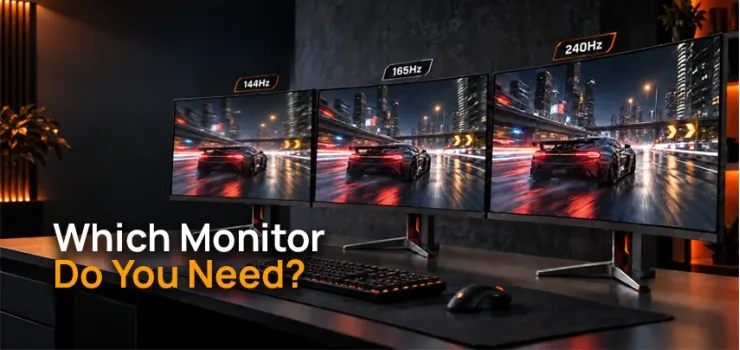
144Hz vs 165Hz vs 240Hz monitor comes down to your budget, your PC's graphics power, and whether you play fast competitive games or casual story titles.
144Hz is the smart baseline for almost everyone; 165Hz is worth it only when it costs barely more than 144Hz; and 240Hz pays off only if you are a serious competitive player with a GPU strong enough to feed it.
We stock gaming monitors across all three tiers, from entry-level 144Hz IPS panels around ৳16,200 to premium 240Hz OLED displays up to ৳2,41,758, so this guide breaks down exactly which refresh rate is worth your money.
144Hz vs 165Hz
The difference between 144Hz and 165Hz is small and comes with diminishing returns for most buyers.
On paper, 165Hz is about 14% faster than 144Hz
In real-world use, most people cannot see the difference
165Hz is often just a mildly overclocked 144Hz panel, more a pricing tier than a true upgrade
What we see in practice: in blind comparisons, even experienced gamers cannot reliably tell 144Hz and 165Hz apart.
The 14% gap on paper rarely shows up as extra smoothness once you are actually playing.
If a 165Hz monitor costs about the same as a 144Hz one, pick the 165Hz. Do not pay extra just for the higher number on the box.
Moving to 240Hz
A 240Hz monitor refreshes the image 240 times per second, dropping the per-frame hold time to 4.17 milliseconds compared to 6.06 milliseconds at 165Hz.
It lowers input lag and cuts motion blur during fast tracking
It helps most in competitive esports and fast first-person shooters like CS2 or Valorant
Your PC must output a steady 240 frames per second to use it well, which needs a genuinely powerful graphics card
What we see in practice: for competitive FPS players, the smoother tracking and lower latency are worth the jump.
For everyone else, a well-fed 165Hz or even 144Hz screen already captures most of the benefit you can actually perceive.
What Is Refresh Rate and Why It Matters
Refresh rate is how many times per second your monitor redraws the picture on screen. It is measured in Hertz, written as Hz.
A high refresh rate monitor simply updates the image more often, so movement looks smoother and sharper.
A 144Hz monitor refreshes the screen 144 times per second
A 165Hz monitor refreshes the screen 165 times per second
A 240Hz monitor refreshes the screen 240 times per second
Higher refresh rates cut down motion blur, screen tearing, and input lag.
That is why fast shooters like Valorant, CS2, and Apex Legends feel noticeably smoother on a high-Hz panel than on a standard 60Hz screen.
Quick Tip: If you mostly play story games or browse the web, a 60Hz to 75Hz screen is still fine. The jump to high refresh rate matters most once your games move fast.
Refresh Rate vs. Frame Rate (FPS)
These two terms get mixed up all the time, but they measure different things.
Refresh rate vs frame rate is really a question of hardware versus output. Refresh rate is set by your monitor. Frame rate, or FPS, is set by your graphics card and your game settings.
The golden rule is simple.
Your FPS needs to match or beat your refresh rate for you to actually feel the benefit. If your GPU only pushes 100 FPS on a 144Hz screen, you are not getting 144Hz performance.
You are getting 100Hz performance with a 144Hz label. And if your GPU renders 300 FPS on that same 144Hz panel, you will see screen tearing unless G-Sync or FreeSync is switched on.
Can You Actually See the Difference? What the Data Says
Yes, but the gap gets smaller as the numbers climb.
Every frame on a 144Hz screen stays on screen for 6.94 milliseconds. On 165Hz that drops to 6.06 milliseconds. On 240Hz, it falls to just 4.17 milliseconds.
Going from 144Hz to 165Hz barely registers to the human eye, but going from 165Hz to 240Hz produces a measurable, if still modest, drop in blur.
This comes down to something called sample-and-hold blur.
Your eyes track a moving object smoothly, but each frame sits still on the screen for that hold time.
Your brain reads the gap between your eye's smooth tracking and the screen's static frame as blur. A shorter hold time means less of that mismatch.
Independent blind testing and real-world benchmarks show a consistent pattern:
144Hz vs 165Hz: Most gamers, even experienced ones, cannot reliably tell these apart in blind comparisons.
The 14% theoretical improvement rarely shows up as extra smoothness during actual gameplay.165Hz vs 240Hz: The gap is real but still subtle, roughly 30% less motion blur and 2 to 3 milliseconds lower input lag.
Competitive players notice marginally cleaner tracking. Casual players usually cannot tell without a side-by-side test.60Hz vs 144Hz: This jump is dramatic and universally noticeable. It is the upgrade that actually changes how a game feels.
144Hz vs 165Hz: Is There a Real Difference?
On paper, 165Hz is 14% faster than 144Hz. In practice, the difference is negligible for the vast majority of gamers, and most people spend more money than the upgrade is worth.
When 165Hz Actually Helps
165Hz becomes worth choosing over 144Hz only in a few specific situations.
You are already hitting 144+ FPS consistently in competitive titles like Valorant, CS2, or Overwatch 2, and every millisecond of responsiveness matters for ranked play
The 165Hz monitor is priced within ৳500 to ৳1,000 of an equivalent 144Hz model, which happens often during seasonal sales
You use FreeSync or G-Sync, and your FPS fluctuates between 140 and 165, since the higher ceiling keeps adaptive sync from switching off
For casual gamers, story-driven players, and content creators, 144Hz delivers essentially the same real-world smoothness for less money.
165Hz vs 240Hz: Where the Gap Gets Real
This is where diminishing returns start to bite, but the improvement is also more noticeable than the jump from 144Hz to 165Hz.
240Hz makes sense mainly for pro and semi-pro esports players in Valorant, CS2, and Apex, where the extra clarity and lower latency directly affect close aim duels.
It also suits anyone running an RTX 4060, RX 7600, or a stronger card that can actually sustain 240+ FPS at 1080p. For everyone else, 165Hz, or plain 144Hz, remains the more rational purchase.
Do You Actually Need a High Refresh Rate Monitor?
The honest answer depends on what you play and what GPU powers it.
A ranked shooter player needs more Hz than someone who plays story games on the weekend, and an editor needs color accuracy more than a high Hz number.
Competitive/Esports Gamers
Yes, a high refresh rate genuinely helps competitive players, but only if the GPU can keep up.
In Valorant, CS2 (Counter-Strike 2), and Apex, a higher refresh rate reduces input lag and sharpens motion clarity, which translates into faster reactions and steadier tracking.
144Hz is the practical minimum for competitive play.
165Hz gives a small edge if your FPS regularly clears 150. 240Hz is worthwhile only for serious competitors running an RTX 4060-class GPU or better.
Casual and Story-Driven Gamers
144Hz is more than enough for this group, and paying for anything higher rarely changes how the game feels.
In single-player titles like Cyberpunk 2077, Elden Ring, or GTA V, you will rarely pass 100 to 120 FPS even on strong hardware, so the extra headroom of 165Hz or 240Hz goes unused.
For this group, panel quality, color accuracy, and HDR support matter far more than chasing the best refresh rate for gaming.
Content Creators, Editors, and Office Users
Refresh rate is the least important spec for this group.
Studies on visual comfort during text-heavy work show no meaningful drop in eye strain above roughly 75Hz, so a high Hz panel will not make your workday easier on its own.
Color accuracy, resolution, and steady brightness matter far more for editing and coding than the Hz number.
That said, 144Hz still makes scrolling and timeline scrubbing feel noticeably smoother, so it remains a reasonable middle ground for anyone splitting time between work and gaming.
Long Gaming Sessions: Does Higher Hz Reduce Eye Strain?
Higher refresh rates can reduce eye strain, but only indirectly.
Smoother motion means your eyes make fewer small corrections while tracking fast movement, and less perceived flicker leads to lower visual fatigue during long sessions.
There are real limits, though.
Refresh rate alone will not fix eye strain caused by too much brightness, poor text clarity, or glare.
No meaningful comfort improvement above roughly 75Hz for static tasks like reading or coding, and there is no proven extra benefit to 240Hz over 144Hz specifically for reducing fatigue.
A few habits help more than chasing Hz ever will.
Turn on flicker-free and low blue light modes, which come standard on most modern gaming monitors.
Keep brightness around 40 to 60% for typical indoor lighting. And follow the 20-20-20 rule: every 20 minutes, look at something 20 feet away for 20 seconds.
Matching Your Refresh Rate to Your GPU
Buying the right monitor means nothing if your graphics card cannot feed it. The GPU decides how many frames actually reach the screen, and the monitor only sets the ceiling.
What Happens If Your GPU Can't Keep Up
If your GPU averages below your monitor's refresh rate, you are wasting money on unused Hz. A 240Hz panel fed by 120 FPS performs like a 120Hz display, nothing more.
Without adaptive sync, this mismatch also causes screen tearing, and wildly swinging FPS produces stutter that breaks immersion.
Here's a simple rule: pick a monitor whose refresh rate your GPU can hit at least 80% of the time in the games you actually play
Our PC builder tool can help you match a monitor to a GPU before you check out.
Real GPU Benchmarks by Refresh Rate Tier
At 1080p on competitive low to medium settings, GPU class largely decides which refresh tier is worth buying.
At 1440p on competitive settings, an RTX 3060 12GB manages 260 to 320 FPS in Valorant and 200 to 250 in CS2, which makes it a reasonable floor for 165Hz but a stretch for full 240Hz.
An RTX 4060 pushes those numbers into 240Hz territory more comfortably.
In practice, an RTX 3060 12GB is the realistic minimum for 240Hz gaming in Valorant and CS2 at 1080p. An RTX 4060 or RX 7600 is the genuine sweet spot for 240Hz esports.
Budget cards like the GTX 1650 or RX 6400 should stick to 144Hz, since they simply cannot generate the frames to justify anything higher.
Browse our graphics card range to check what fits your target tier.
144Hz vs 165Hz vs 240Hz Monitor Price in Bangladesh (2026)
Our current lineup gives a clear snapshot of real pricing across all three tiers, and it is a useful reference whether you shop with us or elsewhere.
Entry-level 144Hz IPS monitors, like the Gigabyte GS25F14, start around ৳16,200 to ৳18,500, making them the most accessible way into high refresh rate gaming.
165Hz models usually cost only ৳1,000 to ৳3,000 more than an equivalent 144Hz panel, which is often the real deciding factor rather than raw performance.
240Hz monitors carry a much steeper 3 to 10x price premium over 144Hz, and that premium is only justified when it is paired with a GPU that can actually hit those frame rates.
Should You Pay Extra for 165Hz Over 144Hz in BD Right Now?
It is worth the extra money only in three cases.
The price gap is under roughly ৳1,000
You play Valorant or CS2 competitively and consistently clear 150+ FPS
The 165Hz option happens to have a better panel, IPS instead of TN, for example
Outside these cases, that ৳1,000 to ৳3,000 is better spent on a stronger GPU, a better mouse, or a mechanical keyboard. You will notice all three far more in daily use than the extra 21Hz.
The Real Cost to Feed Each Tier
Buying the monitor is only half the equation. You also need a GPU capable of actually using it, and that changes your real budget quite a lot.
Most Bangladeshi gamers build systems in the ৳50,000 to ৳80,000 range.
In our experience helping buyers plan builds at that budget, a 144Hz monitor paired with an RTX 3050 or RX 6600 delivers a far better experience than a 240Hz panel choked by a GPU that cannot feed it. If you would rather skip the build process, our prebuilt gaming PCs come matched to sensible monitor tiers already.
Other Specs That Matter as Much as Refresh Rate
Refresh rate is only one piece of the picture. Panel type and sync technology often shape how a monitor actually feels more than the Hz number printed on the box.
Panel Type Matters Too: TN vs IPS vs VA vs OLED by Refresh Tier
The panel behind your refresh rate decides color, contrast, and how fast each pixel can actually change, which is where response time vs refresh rate starts to matter.
OLED dominates in motion clarity.
A 240Hz OLED panel can look smoother than a faster IPS screen simply because its pixel transitions are close to instant.
For most Bangladeshi buyers, though, Fast IPS is the sweet spot: quick response times, excellent color, wide viewing angles, and prices that stay reasonable across the 144Hz to 240Hz range.
VA panels suit story-driven, dark-room gaming thanks to their deep contrast, but their slower response time makes them a weaker fit for fast-paced shooters.
TN panels, once the default for esports, are increasingly outclassed by Fast IPS on every metric except raw pixel response, and even that gap keeps narrowing.
If you want an immersive setup for single-player games, our curved monitor range and 4K monitor lineup are worth a look, since resolution and screen shape matter more than Hz for that kind of play.
G-Sync / FreeSync and Why They Matter More Than the Hz Number Alone
Adaptive sync technologies, NVIDIA G-Sync and AMD FreeSync, dynamically match your monitor's refresh rate to your GPU's actual frame rate.
This is G-Sync/FreeSync adaptive sync working as intended, and it removes screen tearing, stutter, and the input lag spikes that come with older V-Sync methods.
This matters more than the raw Hz number.
A 144Hz monitor with G-Sync or FreeSync enabled often feels smoother in real gameplay than a 240Hz panel without it, simply because FPS in real games constantly rises and falls.
Most gaming monitors sold in Bangladesh today, across all three refresh tiers, include FreeSync or G-Sync Compatible certification.
What we consistently see, though, is buyers forgetting to actually turn it on in their NVIDIA or AMD control panel, a small mistake that quietly wastes the investment in a high refresh monitor and leaves input lag gaming monitor complaints that a five-second setting change would fix.
Common Mistakes to Avoid When Buying a High Refresh Rate
The most common mistake we see at the counter is not about the monitor at all. It is the cable plugged into it.
HDMI vs DisplayPort: Why Your Cable or Port Might Be Capping Your Refresh Rate
Not every cable or port supports high refresh rates at every resolution, and this trips up more buyers than any single spec on the monitor's box.
Many budget monitors still ship with an HDMI 1.4 cable in the box.
If you plug a 144Hz monitor into an HDMI 1.4 port, you will be capped at 60Hz or 75Hz no matter what the monitor is rated for.
The fix is straightforward. Use DisplayPort whenever possible for 144Hz, 165Hz, or 240Hz, double-check that older GPUs, like GTX 10-series cards, actually support your target refresh rate over your chosen port, and pick up a certified DisplayPort 1.4 cable or the right HDMI cable if your monitor does not already include one.
Final Verdict: Which Refresh Rate Should You Buy?
For most gamers in Bangladesh, the decision comes down to your GPU and how competitively you play, more than anything printed on the monitor's spec sheet.
Do not overspend on 240Hz unless you are a ranked Valorant or CS2 player running an RTX 4060 or better.
For nearly everyone else, 144Hz remains the smart baseline in Bangladesh right now: affordable, widely available, and smooth enough for almost every real use case.
165Hz is worth paying for only when it sits within about ৳1,000 of 144Hz, and panel quality, adaptive sync, and GPU matching will shape your experience far more than the Hz number printed on the box.
We stock genuine monitors across all three refresh tiers, from entry-level 144Hz IPS panels to premium 240Hz OLED displays, backed by an official warranty and nationwide delivery.
Use our product comparison tool to line up your shortlist side by side, match it to your GPU, and buy the Hz number your budget can actually use, not just the biggest one on the shelf.
Your 144Hz vs 165Hz vs 240Hz Questions, Answered
Is there a real difference between 144Hz and 165Hz?
Barely; on paper it's 14% faster, but most gamers can't tell in a blind test.
Is 165Hz better than 144Hz for gaming?
Only slightly, and only worth it if it costs close to the same as 144Hz.
Do I need 240Hz for competitive gaming?
Only if you're a serious competitive player with a GPU like an RTX 4060 or better to actually feed it.
What's the difference between refresh rate and FPS?
Refresh rate is how many times your monitor updates the image per second; FPS is how many frames your GPU actually renders per second.
Is 144Hz still good enough for gaming in 2026?
Yes, it's still the smart baseline for almost everyone, casual and competitive alike.
Can my GPU actually run a 240Hz monitor?
Only GPUs around an RTX 3060 12GB or stronger can realistically sustain 240Hz in competitive titles at 1080p.
Which refresh rate is best for casual or single-player gaming?
144Hz, since you'll rarely exceed 100 to 120 FPS in single-player titles anyway.
Is a 165Hz monitor worth the extra price over 144Hz in Bangladesh?
Only if the price gap is under about ৳1,000, or you consistently clear 150+ FPS in competitive games.




-330x240.webp)

Comments
There are no comments for this Article.