





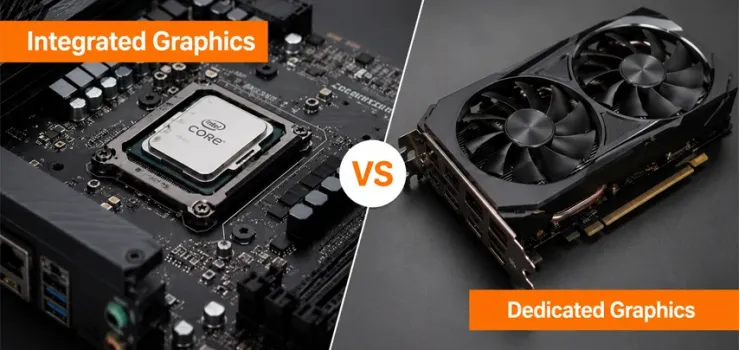
Integrated graphics (iGPU) is built into the CPU, shares system RAM, and efficiently handles everyday tasks like browsing, office work, and video calls. A dedicated GPU (dGPU) is a separate chip with its own VRAM, designed for gaming, 4K video editing, 3D rendering, and machine learning workloads that integrated graphics cannot handle. For most students and office users in Bangladesh, integrated graphics is perfectly sufficient and saves ৳15,000 to ৳80,000 on the cost of a laptop or PC. For gamers, content creators, and engineers who run GPU-intensive software, a dedicated GPU is not optional. Here we explain both clearly, show you which one you actually need, and help you avoid overspending on GPU power you will never use.
The ৳50,000 Mistake Most PC Buyers Make
The integrated vs dedicated graphics question is the one most laptop and PC buyers in Bangladesh get wrong.
You either buy a laptop with a dedicated GPU you never actually use, wasting ৳20,000 to ৳50,000 on a feature that just drains your battery faster. Or you buy a cheaper integrated graphics laptop and then find it cannot handle the game or software you need it for.
Both mistakes are expensive and avoidable. Let’s determine exactly which option is right for your specific use case.
Whether you are shopping at the best computer shop in Bangladesh or comparing specs online, understanding this one difference will save you from buying the wrong machine.
EERNA helps Bangladesh buyers make this choice every day across laptops, desktop builds, and workstation configurations.
What Is Integrated Graphics?
Integrated graphics is a GPU built directly into the same chip as your CPU. Intel calls theirs Intel UHD or Intel Iris Xe. AMD calls theirs Radeon Graphics. Apple's M-series chips have their own integrated GPU.
Instead of having its own dedicated memory, integrated graphics borrows a portion of your system RAM to store and process graphics data.
The fact keeps the chip small, power-efficient, and affordable, which is why almost every budget and mid-range laptop ships with integrated graphics as the default.
What Integrated Graphics Are Good At
Integrated graphics handle everyday computing tasks without any difficulty. It includes web browsing across dozens of tabs, Microsoft Office and Google Workspace, 4K video streaming, Zoom and Google Meet calls, PDF reading and annotation, email and social media, light photo viewing and basic editing, and running most educational and productivity software used in Bangladesh's universities and offices.
Modern integrated graphics from Intel Iris Xe and AMD Radeon on Ryzen have become significantly more capable in recent years, handling tasks that required a dedicated GPU five years ago.
Limitations of Integrated Graphics
Integrated graphics reach its limit when software demands sustained, high-volume parallel processing. AAA gaming at any playable frame rate is beyond most iGPUs. 4K video editing with color grading, effects, and noise reduction causes dropped frames and slow renders.
3D modeling and animation in Blender or AutoCAD runs at reduced quality or speed. Machine learning training and inference require GPU compute that integrated chips cannot provide at useful speeds.
The core reason for all these limitations is that integrated graphics borrows from your RAM, leaving less for everything else and providing far lower memory bandwidth than the dedicated VRAM on a discrete GPU.
For a deeper look at how different GPU architectures compare, the AMD vs NVIDIA vs Intel graphics card comparison tells you the full breakdown.
What Is a Dedicated (Discrete) GPU?
A dedicated GPU is a separate graphics chip with its own video memory (VRAM), cooling system, and power supply. It sits independently from the CPU and handles graphics processing entirely on its own hardware.
In laptops, dedicated GPUs from NVIDIA (RTX 40 and 50 series) and AMD (Radeon RX series) are added alongside the CPU's integrated graphics.
In desktops, a dedicated GPU is a physical card you install into a PCIe slot on the motherboard. The dedicated GPU takes over all graphics tasks when active, freeing the CPU and system RAM from graphics workloads entirely.
What a Dedicated GPU Enables
Gaming: AAA titles at 1080p, 1440p, and 4K with high frame rates. Without a dedicated GPU, most modern games are unplayable at acceptable settings.
4K and 6K video editing: GPU-accelerated rendering in Premiere Pro, DaVinci Resolve, and Final Cut Pro. The GPU handles color science and effects processing in real time.
3D design and rendering: Blender, AutoCAD, SolidWorks, and other 3D applications use GPU cores for viewport rendering and final render acceleration.
Machine learning and AI: Training neural networks, running local AI models, and using CUDA- or ROCm-based frameworks like PyTorch and TensorFlow requires dedicated GPU compute.
High-resolution multi-monitor setups: Driving two or three displays at high resolution simultaneously is far more stable with a dedicated GPU than shared integrated memory.
What a Dedicated GPU Costs You
A dedicated GPU adds real cost and tradeoffs that matter for Bangladesh buyers. In laptops, the GPU adds ৳15,000 to ৳80,000 to the purchase price depending on the tier.
A laptop with an active dedicated GPU loses 2 to 4 hours of battery life compared to running on integrated graphics. Heat increases, which means fans run louder and more frequently. The laptop is heavier due to the additional cooling hardware.
In a desktop, a mid-range dedicated GPU like the NVIDIA RTX 4060 adds approximately ৳35,000 to ৳45,000 to the build cost.
Integrated vs Dedicated Graphics: Head-to-Head Comparison
The table below provides a complete side-by-side comparison of integrated and dedicated graphics across every factor that matters to Bangladesh buyers. Use this as your reference before choosing any laptop or desktop PC.
The Third Option: Both at Once (Switchable Graphics)
Most modern laptops with a dedicated GPU actually contain both an integrated GPU and a dedicated GPU running simultaneously.
The system switches between them automatically, based on the integrated mode for office tasks and video calls to preserve battery, and the dedicated mode when you open a game or launch heavy creative software.
This hybrid approach is what makes modern gaming laptops usable for full workdays without constant charging.
MUX Switch: What It Is and Why It Matters
A MUX switch (Multiplexer switch) is a hardware feature found on premium gaming laptops that lets you manually force the system to route display output directly through the dedicated GPU, bypassing the integrated graphics entirely.
Without a MUX switch, even when your dedicated GPU is running, some performance is lost because the image still passes through the iGPU before reaching the screen.
With the MUX switch enabled, you gain 10% to 30% more gaming performance from the same dedicated GPU. Look for this feature on gaming laptops in the ৳ 80,000-and-above bracket in Bangladesh.
AMD APU: The Special Case for Desktops
AMD Ryzen processors with built-in Radeon graphics, called APUs (Accelerated Processing Units), offer integrated graphics that are significantly more capable than Intel UHD graphics.
The AMD Ryzen 5 7600G and Ryzen 7 8700G APUs, for example, can run some esports titles and older games at playable frame rates without a dedicated GPU.
For budget desktop builders in Bangladesh who cannot afford a dedicated GPU right now, an AMD APU provides a usable gaming baseline that Intel integrated graphics cannot match, with the option to add a dedicated GPU later.
Who Should Choose Integrated Graphics?
Integrated graphics is the right and sufficient choice for the majority of laptop and PC buyers in Bangladesh. Choose integrated graphics if your computing is dominated by any of the following uses:
Students: Research, document writing, online classes, presentations, and learning management systems like Google Classroom all run flawlessly on integrated graphics.
Office professionals: Excel, Word, email, Teams, Zoom, browser-based tools, and PDF workflows place minimal demand on GPUs. Integrated graphics handle all of it without throttling.
Freelancers doing text work: Writers, translators, virtual assistants, data entry specialists, and customer support agents have no need for a dedicated GPU.
Casual media consumers: YouTube, Netflix, Facebook video, and even 4K streaming are fully handled by modern integrated graphics.
Light photo editors: Adobe Lightroom Classic, Snapseed, and basic retouching in Photoshop run adequately on Intel Iris Xe and AMD Radeon integrated graphics.
Saving ৳20,000 to ৳50,000 by skipping a dedicated GPU and putting that money toward more RAM or a faster SSD will improve your daily computing experience more than a GPU you never use. Browse integrated graphics laptops in the laptop collection for current pricing offered by EERNA.
Who Needs a Dedicated GPU?
A dedicated GPU is not optional for the following use cases. If your work or hobby falls into any of these categories, do not buy a machine without dedicated graphics:
Gamers: Any AAA title released after 2018 requires a dedicated GPU to run at playable frame rates and acceptable visual quality. Integrated graphics will run these games poorly or not at all.
Video editors working at 1080p and above: GPU acceleration in editing software is not a luxury. It is what makes timeline playback smooth and export times reasonable.
3D designers and architects: AutoCAD, SketchUp, SolidWorks, and Blender use GPU rendering for viewport display and final output. Integrated graphics produces slow, low-quality 3D viewport performance.
Machine learning practitioners: Training models on CPU is impractically slow. GPU compute from NVIDIA CUDA or AMD ROCm is standard for ML work in Bangladesh's growing tech sector.
Graphic designers doing heavy compositing: Multi-layer Photoshop files, motion graphics in After Effects, and GPU-accelerated effects in Premiere Pro all benefit significantly from dedicated VRAM.
Check graphics card prices in Bangladesh at EERNA for current dedicated GPU options across NVIDIA RTX and AMD Radeon ranges, all available with official warranty and after-sales support.
How to Check What Graphics Your Laptop Has
You can identify your laptop's graphics in under 30 seconds using built-in Windows tools. No downloads or technical knowledge needed.
Method 1 (Windows): Right-click the Start menu, select Device Manager, and expand the Display Adapters section. If you see only one entry (Intel UHD or AMD Radeon), you have integrated graphics only. If you see two entries, including an NVIDIA GeForce or AMD Radeon RX card, you have switchable graphics with a dedicated GPU.
Method 2 (Windows): Press Windows key + R, type dxdiag, press Enter. Click Display at the top. The graphics card name and dedicated VRAM amount appear here. If VRAM shows 128MB or 256MB, that is shared integrated memory, not dedicated VRAM.
Method 3 (Spec sheet): Check the laptop's product listing on EERNA. The graphics specification clearly states whether the laptop has Intel UHD, Intel Iris Xe, AMD Radeon (integrated), or an NVIDIA RTX or AMD RX discrete card.
Quick Decision Guide: Which GPU Is Right for You?
Use this table to make your final decision in one minute. Match your primary use case to the recommended graphics option.
If you are still unsure after this table, the answer is almost always integrated graphics for buyers in Bangladesh. The cases that genuinely require a dedicated GPU are specific and demanding. If your use case is not in the dedicated GPU rows above, save the money and invest it in RAM or SSD instead. For a complete desktop PC build with the right GPU for your workload, browse EERNA's full range of graphics cards.
Frequently Asked Questions on Integrated vs Dedicated Graphics
What is the difference between integrated and dedicated graphics?
Integrated graphics are built into the CPU and share system RAM. A dedicated GPU is a separate chip with its own VRAM, designed for intensive graphics workloads like gaming and video editing.
Is integrated graphics good enough for gaming?
No, for AAA titles. Integrated graphics cannot run modern games at playable frame rates. It handles very old games and some esports titles only at low settings. A dedicated GPU is required for gaming.
Do I need a dedicated GPU for video editing?
For 1080p basic editing, integrated graphics are manageable. For 4K editing, color grading, and effects, a dedicated GPU is necessary for smooth playback and fast export times.
Can I add a dedicated GPU to a laptop with integrated graphics?
No. Laptop GPUs are soldered and cannot be swapped or added after purchase. Choose the right GPU when buying. External GPU enclosures exist but are expensive and rarely practical in Bangladesh.
How do I know if my laptop has a dedicated GPU?
Open Device Manager on Windows and check the Display Adapters section. Two entries mean you have both integrated and dedicated graphics. One entry means integrated only. Alternatively, check the spec sheet on EERNA.
What does integrated graphics mean on a laptop?
Integrated graphics means the GPU is built into the same chip as the CPU. It uses shared system RAM instead of dedicated VRAM and handles everyday tasks without a separate graphics card.
Is integrated graphics better than dedicated?
No, not for performance. A dedicated GPU is always more powerful. But integrated graphics are better for battery life, heat, noise, and cost. Choose based on your actual workload, not raw performance numbers.




-330x240.webp)



Comments
There are no comments for this Article.