





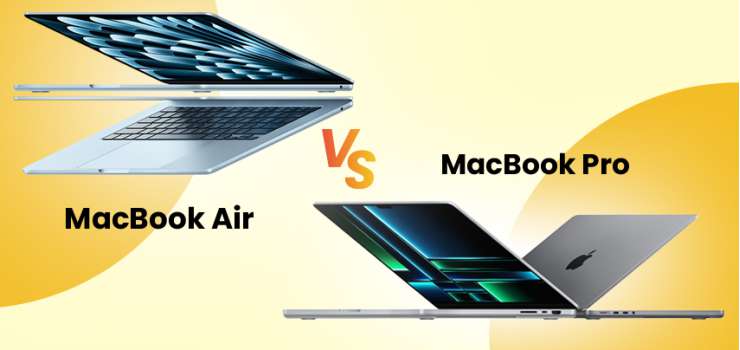
MacBook Air and MacBook Pro are your two definite choices if you are thinking of buying an Apple laptop right now.
While it may put you into some sort of relaxation with only two variations to choose from, it’s actually not that easy.
There is a lot in play under the hood, setting both models apart in appearance, performance, connectivity, and overall experience.
With distinct screen sizes, chipsets, battery coverage, and number of ports, the argument on MacBook Air vs MacBook Pro settles on your unique needs and demands.
This guide will walk you through the premium landscape of Apple’s portable PC world. It will introduce you to available options and navigate through their features to help you reach a thoughtful decision.
The Core Differences: MacBook Air vs MacBook Pro at a Glance
Let me start by giving you a simple mental roadmap to follow the key differences between all MacBook models.
First, both Air and Pro have two size variants. Air can be either 13-inch or 15-inch, whereas Pro comes in 14-inch and 16-inch models.
Second, the number. You get a total of 5 products, 2 from the Air and 3 from the Pro lineups.
Third, the differential factors. When choosing an Air, you mainly decide on its size. Their performance doesn’t vary much. But the same can’t be said about the Pro models. Their performance scales with size, with chipsets having a higher number of cores in larger models.
And that’s that.
See, it already feels less cluttered. You know the number of options at hand, how they vary, and where to focus.
A confident buy is just your decision away on the portability, use case, and supportability.
Let’s dive into the greater depth of the MacBook buying playbook.
Design: Colors, Dimensions & Weight
Even after dominating the laptop market for about a decade, MacBooks haven’t stripped off the polished and solid metallic body frame. Over time, it has only become sleeker and smoother. And it’s true for both series.
For colors, you get the ever-popular range, including Silver, Starlight, Midnight, and Sky Blue. The bright reflection on the surface may create a dissolved gradient effect, but that’s all to tone down the gloss and keep it eye-friendly.
Up to this point, things are pretty much on the same track. But they diverge once the dimension and weight measures enter the picture.
Dimension
Size determines how bulky your MacBook will look on your lap, how heavy it will feel in your backpack, and how wide the workspace will be.
Here is how MacBooks vary in width and depth by size variations:
Weight
Larger structures mean more metal and bigger screens. They add up in weight, limiting mobility.
MacBook Air keeps it light, with the 13-inch variant weighing 2.7 pounds and the 15-inch, 3.3 pounds.
MacBook Pros, on the other hand, are heavier, weighing 3.4 pounds and 4.7 pounds, respectively.
Display & Response Rate
When it comes to the MacBook Air, the visual experience is maintained to deliver only the essentials.
A vivid Liquid Retina LCD panel produces bright images. Much of the secret behind this vividness is clipping black from the background, thanks to the default SDR.
In the Pro models, screens are wider, sharper, more detailed, and staggeringly vibrant.
The XDR mini-LED panel does wonders, sustaining black to its elegant depth while creating images in their highest quality. Maybe it’s the right place to mention the added HDR. Motions and transitions feel less corny and smoother.
In terms of refresh rates, the gap is discernible. The Air offers 60Hz, which is the lowest for an Apple PC. The Pro meets the standard by offering 120Hz. This makes a key consideration for regular users, professionals, and gamers.
Performance & Raw Power
All MacBooks are powered by M-series processors. Based on releases, they may span from M1 to M5 variants. They vary in the number of cores they come with.
For example, M4 Pro and M4 Max CPUs have 14 to 16 cores, whereas M4 Basic keeps it between 8 to 10 cores. The latest, M5, seems to have upgraded AI features, without expanding the core counts of its previous generation.
Talk about RAM, the Air offers the minimum, a 16GB unified memory. Where the Pro models outshine with 24GB. The scope for extension is also limited in the Air.
The storage also differs in size across the Air and Pro devices. When a 256GB SSD is the go-to in the Air, all Pro models use 512GB.
Ports & Connectivity
Thunderbolt 4 is the constant in every model. But not their number. You get 2 ports in Airs and 3 in Pros.
Unlike the Pro series, the Air series doesn’t include an HDMI. And since the series’ launch, it has been a deal-breaker for many. You can’t connect to an external monitor. So much for scaling the workspace.
Battery Life & Coverage
Batteries in MacBooks have reset the market standard. And it’s more about the lifespan of the cells than about the duration of the support.
Even with Pro models, a 100Wh Lithium-Ion cell struggles to survive after a 24-hour of regular usage. Heavy video consumption cuts that duration in half. From there, you can easily guess the scenario with the Air’s 52.6Wh batteries.
Apple, however, hasn’t held back while compensating for its battery coverage. The MagSafe 3 charging technology takes only 30 minutes to refill 50% of drained energy.
Note that this comparison only applies to Apple devices. Even premium laptops from other brands fall short in matching the duration and quality of Apple batteries.
Budget & Value for Money
It’s been evident, and always triggering, how MacBook prices leap even for a minimal upgrade. What general buyers overlook here is the amount of boost it adds to the overall performance.
The reason for stating this is to explain the $200 price difference between the 13-inch Air, at $999, and the 15-inch Air, at $1,199. Apart from the size, both variants match in almost every other parameter. You may also want to include 2 extra GPU cores in the latter model.
The three Pro variants cost $1,599, $1,999, and $2,499, respectively. The price difference highlights expansion either in the size, RAM, or core number.
Which MacBook Should I Buy?
Navigating the MacBook market is a test. To prepare, you set your priorities, learn your options, and focus on their unique prospects. What value they provide to address which part of your needs.
First, let’s figure out what is up with a MacBook Air. They are not weak. Not with 16GB RAM and 10-core M4 chipsets. They only come short when compared with the MacBook Pro. Then, how to place them above the Pro models in your wishlist?
The answer lies in the elegance of their lightweight, minimal design. You favor portability, MacBook Air is what you choose.
They are best when you want an easy carry. And things like heavy gaming, professional settings, and immersive visuals don’t ring a bell in your mind. Regular browsing, scraping, working with default office programs, and media consumption are enough to define your lifestyle.
An Air would be more suitable if you are:
A student, in need of the perfect study and school companion
A worker, involved in a job that doesn’t need heavy processing
A researcher, most of whose work has to do with searching, learning, keeping notes, and finding patterns
A hobbyist, maybe a cyclist, who needs to track his road, share experiences, and keep daily logs
A budget-buyer who values minimalism over premiumness
Now the second, MacBook Pro. Power and efficiency drive their worth.
A 16-inch Pro, when open, takes as much space as a desktop setup. They are good if you are not planning to move beyond your home and office. The extra weight in your backpack will remind you of its existence without a break.
The most optimal use case of Pro models includes:
Professional Demands: When every stroke and click needs to be pixel-perfect. Even the slightest deviation makes a difference in the quality of delivery.
Robust Processing Needs: Your work involves manipulating 2K, 4K, or 3D graphics. Weak chipsets lag, hang, and break during rendering your outputs. You can also rely on MacBook Pro for coding large applications.
Creative Environment: For designers and developers, whose imaginations need to be realized in a customizable workspace.
Premium Buyers: Users, planning to invest long term, with the minimum desire to scale soon. People, to whom service, performance, and statements matter the most.
Final Verdict: Power vs. Portability
When choosing a MacBook Air or Pro, it all comes down to two simple decisions. Whether your need is for precise and extensive executions or basic performance with maximum portability. The look and feel don’t put up much of a fight, as all MacBook models come in similar aesthetics and use similar materials. We suggest you clarify your needs, desires, and expectations before clicking the order button. MacBook Air for everyday use
Frequently Asked Questions
What is the main difference between the MacBook Air and MacBook Pro?
Apart from their price, Air and Pro MacBooks vary in sizes, CPU and GPU core counts, RAM, storage, and battery capacity.
Is the MacBook Air good enough for college students?
Perfect would be a more suitable word. The lightweight compact design of MacBook Air comfortably places itself in a student bag, allowing for easy and quick access.
Can I use the MacBook Air for video editing or graphic design?
Generally, using a MacBook Pro for graphic design and editing is possible. Not until you are working with high-resolution and extended files. But if your creative effort involves making short-length videos for social media with some basic motions and effects, a MacBook Air can handle them with ease.
Which MacBook has better battery life?
MacBook Pro offers the largest and most enduring batteries. Pro models pack 100Wh Lithium-Ion cells; when in Air models, they are about half the size, at 52.6Wh.
Is the MacBook Pro worth the extra money over the Air?
Despite the debate, whether the M4 MacBook Air vs M4 MacBook Pro or M3 MacBook Air vs M3 MacBook Pro, the extra cash on MacBook Pro is a worthy investment. Especially when it’s about setting a dream workstation that ticks all the productivity measures. From a wider screen, more robust performance, to longer battery support.
What is the difference between the displays on the MacBook Air and Pro?
In a MacBook Air, the panels are LCD, refreshing at a 60Hz rate. They can glow at up to 500 nits and create colorful visuals. Whereas, Pro screens are wider. Coming in mini-LED panels and leveraging HDR, they provide an evocative and sharp visual experience. The images flow on these panels smoothly at a 120Hz rate.





-330x240.webp)



Comments
There are no comments for this Article.