




Your eyes hurt after a long work session.
You squint at tiny text or crane your neck to see the corners of an oversized screen. These problems disappear when you pick the right monitor size.
The wrong choice leads to pixelated images, wasted desk space, and neck strain. But what size monitor do I need for my specific setup? The answer depends on how you'll use it, where it sits, and how much you want to spend.
After helping hundreds of customers find their perfect displays at EERNA, we've learned which sizes work best for different situations. This guide walks you through measurements, use cases, and practical tips to help you choose confidently.
Understanding Monitor Size Basics
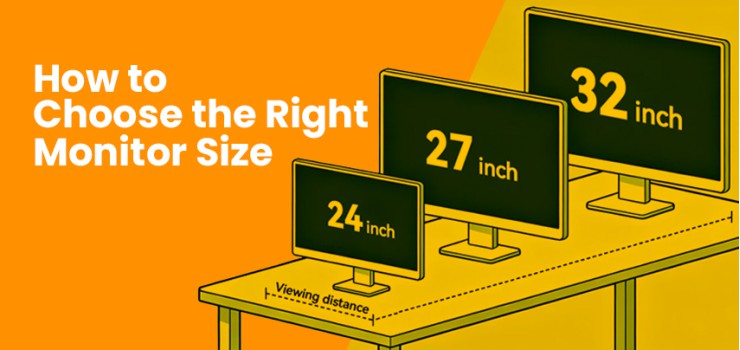
Monitor sizes range from compact 19.5-inch displays to massive 49-inch ultrawides.
Most people find their sweet spot between 24 and 32 inches. Smaller screens like the HP P204v 19.5 Inch HD LED Monitor fit tight spaces perfectly.
Larger displays like the Samsung ODYSSEY G9 49" 240Hz QLED Gaming Monitor create immersive experiences for power users.
Choosing a monitor size starts with understanding the categories.
Standard 16:9 monitors (24-32 inches) handle everyday tasks well for most users
Ultrawide 21:9 models (34-38 inches) like the HP OMEN 34C 34" 165Hz WQHD Curved Gaming Monitor replace dual-monitor setups with one seamless screen
Super ultrawide 32:9 screens stretch across your desk for maximum multitasking power
The 27-inch size has become the most popular choice in 2026. It balances screen space with desk footprint. Models like the LG UltraGear 27GN65R-B 27-inch FHD IPS Gaming Monitor (40,400৳) offer versatility for both work and play.
Pro Tip: Larger screens need higher resolutions to stay sharp. A 32-inch monitor looks blurry at 1080p but crisp at 4K.
How Monitor Size Is Measured
Monitor size measures the diagonal length of the viewable screen in inches.
Manufacturers measure from one corner to the opposite corner, excluding the bezel. A 27-inch monitor actually measures about 27 inches diagonally, though width and height vary by aspect ratio.
For example, a 24-inch 16:9 screen measures roughly 21 inches wide and 12 inches tall.
The same diagonal on a 21:9 ultrawide stretches wider but shorter. Always check specifications because marketing sometimes includes non-viewable areas.
This measurement system lets you compare different brands fairly. The Dahua LM24-B201S 23.8-inch 100Hz FHD IPS Monitor and Samsung LS22C310EAW 21.5" FHD IPS Monitor clearly show their size differences through their model numbers.
Remember: Bezel thickness doesn't count toward screen size.
Thin bezels on modern monitors like the GIGABYTE M27U 27" 4K UHD 160Hz KVM Gaming Monitor give you more viewing area in the same desktop footprint.
Resolution vs. Size Relationship
Resolution determines how sharp your screen looks by setting the total pixel count.
Higher pixel density (measured in PPI or pixels per inch) creates crisper images. A 24-inch 1080p display hits 92 PPI for clear text. Stretch that same 1080p resolution to 32 inches, and PPI drops to 69, making text look fuzzy.
The best monitor size for work pairs properly with resolution.
Match 1080p (Full HD) with 24-inch screens. The NPC MF2208-IPS 22" FHD 100Hz IPS Monitor demonstrates this pairing perfectly. For 27-inch monitors, 1440p (QHD) works best, like the AOC AGON AG275QXW 27" 180Hz 2K QHD Fast IPS Gaming Monitor.
Larger displays demand even higher resolutions.
The GIGABYTE M27U 27" 4K UHD model packs 3840 x 2160 pixels for incredibly sharp details. Jump to 32 inches and 4K becomes essential, as shown by the BenQ MOBIUZ EX321UX 32" 4K 144Hz IPS Gaming Monitor.
Aim for 100+ PPI to reduce eye strain. This pixel density minimizes the gaps between pixels that make your eyes work harder during long sessions.
The Viewing Distance Factor
Your optimal viewing distance should equal 1 to 1.5 times your monitor's diagonal measurement.
This keeps the entire screen within your comfortable field of view. Sit too close, and you'll turn your head constantly. Sit too far, and you'll miss fine details.
A 27-inch monitor works best at 27 to 40 inches away (roughly 69 to 102 cm). The LG 27GR75Q-B 27 Inch UltraGear 165Hz QHD Gaming Monitor sits perfectly at a standard desk depth.
For 32-inch displays, move back to 32-48 inches for comfortable viewing.
Higher resolutions let you sit closer without seeing pixels. A 4K monitor at 32 inches permits closer viewing than a 1080p screen of the same size. According to ergonomics research, keeping your screen top at eye level prevents neck strain.
Curved monitors like the Samsung ODYSSEY G5 27" 165Hz QHD Curved Gaming Monitor wrap around your field of view. This design reduces the effective viewing distance for edge content.
Quick Tip: Use the table below to find your ideal distance:
Monitor Sizes for Different Use Cases
Your primary activities determine which size serves you best. Office workers need different specs than gamers or designers. Here's how to match size with purpose.
Best Monitor Size for Office Work and Productivity
The 24 to 27-inch range dominates office environments for good reason. Here's what works best for different productivity needs:
24-inch displays handle emails, documents, and web browsers comfortably at typical desk distances of 24 to 36 inches.
The Dahua LM24-B201S provides ample space for spreadsheets without overwhelming your deskDual 24-inch setups boost productivity by 20-30% based on our work with hundreds of Bangladeshi professionals. Two monitors fit most 48-inch desks perfectly
34-inch ultrawides like the HP OMEN 34C replace dual-monitor setups with one seamless screen, eliminating the center bezel
27-inch 1440p models offer peak efficiency for single-monitor setups.
The GIGABYTE GS27QA 27" 2K QHD 180Hz Gaming Monitor gives you room to view multiple windows side by sideAvoid screens under 24 inches as they force you to squint at tiny text during long work sessions
Best Monitor Size for Gaming
Gaming performance changes dramatically with screen size. Competitive shooters demand different displays than racing sims or RPGs. Here's what works best for different gaming styles:
24-25 inches for competitive gaming lets you spot enemies in your peripheral vision without moving your head.
The GIGABYTE G24F 2 23.8" 180Hz Full HD IPS Gaming Monitor (24,500৳) delivers fast response times, perfect for esports titles27-inch displays balance competitive edge with immersive gameplay.
The Samsung ODYSSEY G4 LS27BG400EWX 27" 240Hz IPS FHD Gaming Monitor (37,500৳) offers high refresh rates for smooth action across multiple game types32-inch 4K monitors create cinematic depth for story-driven titles where immersion matters more than reaction speed
34-inch ultrawides excel in racing sims and open-world games. The curved design wraps around your vision for natural immersion that transforms the experience.
49-inch super ultrawides like the Samsung ODYSSEY G9 model mimic triple-monitor configurations for extreme sim racing setups
27-32 inches for console gaming works perfectly at desk distances while maintaining the controller comfort zone
Best Monitor Size for Creative Work
Creative work demands precise color accuracy and ample workspace.
Design, photo editing, and video production each benefit from specific screen configurations. Here's what works best for different creative disciplines:
27-inch 4K displays provide the screen real estate to display Photoshop layers, Premiere timelines, and reference images simultaneously.
The Philips Creator Series 27E2F7901 27" 4K UHD Professional Monitor delivers the color accuracy and space creative professionals need
32-inch 4K monitors hit 140 PPI for preserving fine details crucial for precise work.
The ASUS ProArt Display PA279CV 27" 4K HDR Monitor shows every nuance in your 8K footage or detailed illustrations while balancing size with professional color standards38-inch ultrawides like the LG 38WR85QC-W WQHD+ 144Hz Curved Monitor streamline multi-app workflows by eliminating the bezels that interrupt dual-monitor setups
Monitor arms add flexibility for creative workflows, allowing portrait and landscape positioning on demand
Best Monitor Size for Home Entertainment
Your monitor can double as a premium entertainment display.
Whether you're streaming solo or hosting movie nights, the right size transforms your viewing experience. Here's what works best for different entertainment setups:
27-34 inches for solo streaming mimics TV experiences at desk distances.
The LG 32ML600M 32 Inch IPS FHD HDR 75Hz Gaming Monitor turns your workspace into an entertainment center after hours with HDR support for deeper blacks and brighter highlights32-inch 4K displays suit family viewing from couch distances.
The BenQ MOBIUZ EX321UX 32" 4K 144Hz model delivers theatrical quality for movie nightsUltrawide 21:9 formats match cinema aspect ratios for panoramic sports viewing without black bars on top and bottom
Smart monitors like the LG 27SR50F-W 27" FHD IPS with webOS eliminate the need for external streaming devices. Built-in apps let you watch Netflix, YouTube, and other services directly
Desk Space and Room Considerations
Measure your desk depth and width before committing to a monitor size.
Desks deeper than 60 cm accommodate 24-inch displays comfortably. You'll need 80 to 90 cm of depth for 32-inch or larger screens to maintain proper viewing distance.
Width matters too.
A single 27-inch monitor requires about 55 cm of horizontal space. Add 10 cm per monitor for multi-display setups with VESA mounts.
The Kaloc KLC-DS90-2 Double Arm Monitor Desktop Mount Stand (5,800৳) frees desk space by lifting your screens above the surface.
Room lighting affects your viewing experience significantly.
Bright spaces benefit from matte finishes that reduce glare. The positioning of windows and lamps influences where you can place your monitor without reflections washing out your screen.
Important: Leave room for your keyboard, mouse, and other peripherals. Oversized monitors can push your input devices into awkward positions.
Here's a quick reference for desk width requirements:
Budget and Value Considerations
Entry-level 24 to 27-inch monitors with 1080p or 1440p resolution start around 10,000৳ to 25,000৳.
The Aiwa MF2219-B 22" FHD IPS 100Hz Monitor (9,450৳) proves you don't need to spend heavily for solid daily performance.
Mid-range options like the BenQ GW2780 27-inch Full HD Eye-care IPS Monitor (22,380৳) add eye comfort features worth the extra investment.
Premium displays jump to 30,000৳ to 60,000৳ for 32-inch 4K or high-refresh QHD panels. Here's where your money goes at different price points:
Best value around 40,000৳ comes from 27-inch 1440p 144Hz monitors. The LG UltraGear 27GN65R-B (40,400৳) demonstrates this sweet spot for versatile use across work and gaming
Premium OLED displays add 100,000৳+ to your budget but deliver incredible contrast and deep blacks.
The LG 27GR95QE-B 27-Inch UltraGear OLED QHD 240Hz Gaming Monitor (170,000৳) showcases this premium technology
OLED trade-off to consider: These screens risk burn-in with static images like taskbars and desktop icons, making them better suited for gaming than all-day productivity work
From our experience at EERNA's outlets across Bangladesh, most customers find better long-term value prioritizing PPI and connectivity over raw size. Sales in 2026 often bundle monitors with accessories, stretching your budget further.
Pro Move: Wait for seasonal sales when premium models drop 10-20% in price.
Common Monitor Size Mistakes to Avoid
Even experienced buyers make costly sizing errors. These common mistakes lead to eye strain, wasted money, and uncomfortable workspaces. Here's what to avoid:
Going oversized for your space strains your eyes and neck.
A 32-inch monitor at 24 inches away forces constant head movement, and the low PPI makes text fuzzy. Stick to our distance guidelines to prevent these problemsNeglecting desk measurements leaves you with monitors that cramp your keyboards. A monitor may look impressive online, but it might overwhelm a small desk.
Always test your setup virtually before buyingBuying fixed stands ignores ergonomic needs.
Monitors without tilt and height adjustment cause you to hunch over during long sessions. Invest in displays with flexible stands or add a separate arm mount like the Kaloc M360 wall mount (3,600৳)Chasing trends without proper hardware wastes money.
A 49-inch ultrawide needs serious GPU power to drive high resolutions at high refresh rates. Match your monitor ambitions with your PC capabilities
Quick Decision Guide: What Size Monitor Do You Need?
Match your primary use case with these tested recommendations:
Tight space or close viewing: 24 inches with 1080p or 1440p resolution. The Samsung LS22C310EAW 21.5" FHD IPS Monitor fits perfectly.
Daily productivity: 27 inches with 1440p. The AOC AGON AG275QXW 27" 180Hz 2K QHD model (45,000৳) balances everything.
Gaming focus: 25 to 27 inches with high refresh rates. The ASUS TUF Gaming VG279Q3R 27" 180Hz monitor delivers competitive performance.
Creative professional: 32 inches with 4K or a 34-inch ultrawide. The Philips Creator Series 27E2F7901 (88,000৳) provides color accuracy and space.
Entertainment hub: 32 to 34 inches with HDR support for movies and shows.
Power user: 34 to 49-inch ultrawide for maximum multitasking capability.
Scale your choice by budget. Start mid-range and upgrade later when you've identified your specific needs through daily use.
Final Recommendations
The 27-inch 1440p combination serves 80% of users as the versatile powerhouse.
It fits standard desks, maintains sharp images, and handles work and gaming equally well. Gamers chasing every frame and creative professionals working with high-resolution content should consider 32-inch 4K displays or ultrawides when desk space permits.
Measure your desk twice before ordering. Match resolution to size following our PPI guidelines. Prioritize ergonomic adjustability for long-term comfort and health.
The perfect monitor size makes computing feel effortless instead of exhausting.
Quick Answers to Common Monitor Size Questions
What monitor size is best for gaming?
Competitive gamers prefer 24-25 inches for quick awareness, while casual gamers enjoy 27-32 inches for immersive experiences.
Which size is ideal for creative professionals?
27-32 inch 4K displays or 34-38 inch ultrawides provide the workspace and color accuracy designers and video editors need.
Does resolution affect which size I should choose?
Yes, larger screens need higher resolutions to stay sharp. Pair 1080p with 24 inches, 1440p with 27 inches, and 4K with 32+ inches.
How far should I sit from my monitor?
Sit 1 to 1.5 times your monitor's diagonal measurement away (27 inches from a 27-inch monitor, for example).
Are curved monitors better for larger sizes?
Curved screens work best on 32+ inch displays and ultrawides, wrapping the image around your field of view for more comfortable viewing.
Is an ultrawide monitor better than a dual-monitor setup?
Ultrawides eliminate the center bezel for seamless multitasking, but dual monitors offer more flexibility for arranging windows.
How does desk space impact my choice?
Your desk needs 60+ cm depth for 24-inch monitors and 80-90 cm for 32+ inch screens to maintain a comfortable viewing distance.
Can a monitor be too big?
Yes, oversized monitors at close distances cause eye strain, neck pain, and constant head movement to see screen edges.
Does screen size affect computer performance?
Larger monitors with higher resolutions demand more GPU power, so match your display size with your graphics card capabilities.



-330x240.webp)


Comments
There are no comments for this Article.